




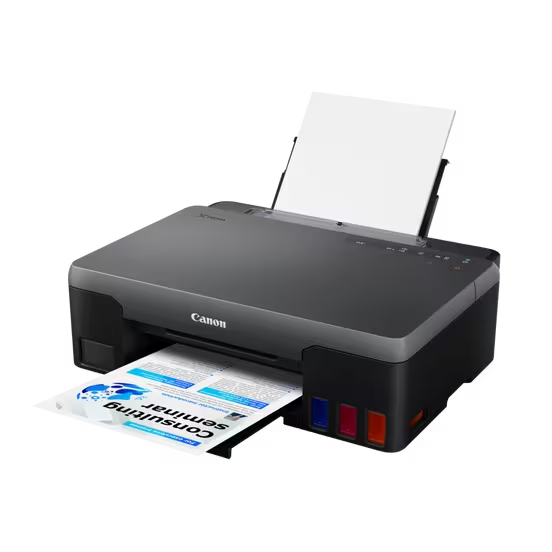


Canon PIXMA G1420 | Inkjet Printer
High-Volume Performance Meets Cost-Efficiency: Canon PIXMA G1420
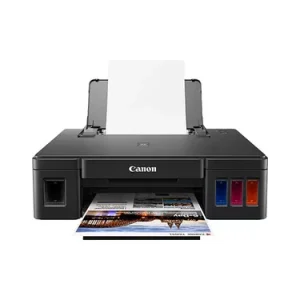
Streamline your printing with the Canon PIXMA G1420, an ink tank printer designed for those who need to print more while spending less. Designed as a workhorse for home offices and educational environments in South Africa, the G1420 replaces expensive cartridges with high-capacity ink tanks that provide thousands of pages of crisp text and vibrant imagery.
Whether you are printing school assignments, office documents, or promotional materials, the G1420 delivers professional quality consistently. Its robust design ensures it can handle daily heavy workloads, making it a reliable partner for growing businesses and busy households.
Key Features:
Advanced Ink Tank System: Enjoy significantly lower costs per page with high-capacity ink tanks that last much longer than standard cartridges.
Reliable Durability: Built to handle high-volume printing tasks daily without compromising on quality.
Vibrant Quality: Delivers sharp, clear text and rich colors for everything from documents to photos.
Space-Saving Design: A compact footprint that fits perfectly into any desk or office setup in South Africa.
R3975.49
Print More. Spend Less.
The Canon PIXMA G1420 is a high-performance ink tank printer designed for heavy-duty use. With its large ink capacity, it provides an economical solution for students and small businesses in SA who need to print hundreds of pages with minimal costs. Enjoy reliable performance and vibrant prints in one compact unit.
General Specifications
-
Model NumbersPIXMA G1420
-
FunctionsPrint
Printer Specifications
-
Print ResolutionUp to 4800 x 1200 dpi1
-
Print Technology2 FINE Print Head (Black and Colour)
Refillable ink tank printer -
Mono Print Speedapprox. 9.1 ipm2
-
Colour Print Speedapprox. 5.0 ipm3
-
Photo Print SpeedBorderless 10x15cm : Approx. 45 seconds4
-
Borderless PrintingYes
A4, LTR, 4″ x 6″5 -
Two Sided PrintingManual operation
Cartridges and Yields
-
Standard Ink CartridgesGI-41 <PGBK>
GI-41 <C>
GI-41 <M>
GI-41 <Y> -
Cartridge Yield (Plain Paper)
-
Cartridge Yield (Photo)
Paper Support
-
Paper TypesPlain Paper
Photo Paper Pro Luster (LU-101),
Photo Paper Plus Glossy II (PP-201)
Matte Photo Paper (MP-101),
Glossy Photo Paper “Everyday Use” (GP-501)
High Resolution Paper (HR-101N),
Envelope,
Photo Paper Plus Semi-gloss (SG-201),
Cardstock (manufactured by Neenah Paper and INKPRESS)
Greeting Card (manufactured by Avery and RedRiverPaper)
Canon Red Label Superior (WOP111)
Canon Oce Office Colour Paper (SAT213)
Cardstock
Restickable Photo Paper(RP-101)
Magnetic Photo Paper(MG-101)
Dark Fabric Iron on Transfers (DF-101),
Light Fabric Iron on Transfers (LF-101),
Double sided Matte Paper (MP-101D) -
Maximum Paper InputRear Tray: Max. 100 sheets (plain paper)
-
Paper SizesA4, LTR, LGL, 4″ x 6″
[Custom size] width 101.6mm – 216 mm, length 152.4mm – 1200 mm
-
Paper WeightRear Tray: Plain paper: 64 – 105 g/m²
Canon specialty paper: max paper weight : approx. 275 g/m²
(Photo Paper Plus Glossy II PP-201)
Interface
-
Display Type & SizeN/A
-
InterfaceHi-Speed USB (USB B Port)
-
Print Applications & MethodsEasy-PhotoPrint Editor Software9
Software
-
Supported Operating SystemsWindows 10、Windows 8.1、Windows 7 SP1
Operation can only be guaranteed on a PC with pre-installed Windows 7 or later.
Printer driver, IJ Printer Assistant Tool are available with following OS.
Windows Server 2008 R2 SP1、Windows Server 2012 R2、Windows Server 2016、Windows Server 2019Chrome OS
Mac: macOS 10.12.6 ~ macOS 10.1510
-
Minimum System RequirementsWindows: 1.5GB or more
Note: for bundled software installation. The necessary amount of hard disk space required.
Display: 1024 x 768 XGA -
Software IncludedPrinter Driver
IJ Printer Assistant Tool
Easy-PhotoPrint Editor (download)
Physical Features
-
Weightapprox. 4.8 kg
-
Dimensions (W x D x H)Approx. 445 x 330 x 135 mm
-
Acoustic Noise Levelsapprox. 49.5dB(A)11
-
Recommended Operating EnvironmentOperating Temperature: 5-35°C
Operating Humidity: 10-90%RH (no dew condensation) -
Power SourceAC 100-240V, 50/60Hz
-
Power ConsumptionOff: Approx. 0.2W
Standby (USB connection to PC): Approx. 0.6W
Time to enter Standby mode: 4minutes 34sec
Printing: Approx. 15W12 -
Typical Electricity Consumption0.09 kWh13
- Ink droplets can be placed with a minimum pitch of 1/4800 inch
- A4 document print speed on plain paper is measured based on average of ESAT in Office Category Test of ISO/IEC 24734 standard.
- A4 document print speed on plain paper is measured based on average of ESAT in Office Category Test of ISO/IEC 24734 standard.
- Photo print speed is based on default driver setting using ISO/JIS-SCID N2 standard on Canon Photo Paper Plus Glossy II and does not take into account data processing time on host computer.
- Paper types NOT supported for borderless printing are as follows: Envelope, High Resolution Paper, T-Shirt Transfer, Photo Stickers
- Page Yield is the estimated value based on Canon individual test method using the ISO/IEC 24712 chart and continuous printing simulation with the replacement after initial setup.
- The economy mode reduces the black ink consumption by lowering the density, 26% more pages than the standard mode can be printed
- Page Yield is the estimated value based on Canon individual test method using the ISO/IEC 29103 chart and continuous printing simulation with the replacement after initial setup.
- The Easy-PhotoPrint Editor software requires an Internet connection and is compatible with the following operating systems; Microsoft Windows 10 (64-bit/32-bit), Microsoft Windows 8.1 (64-bit/32-bit), Microsoft Windows 7 SP1 (64-bit/32-bit), macOS High Sierra v10.13, macOS Sierra v10.12, Mac OS X El Capitan v10.11 and Mac OS X El Capitan v10.10.5. Minimum Windows and macOS/Mac OS X requirements are: 2GB of RAM and a monitor with 1024×768 resolution.
- Some functions may not be available with these Operating Systems. Please refer to the manual or website for details.
- Plain Paper(A4, B/W). Acoustic Noise is measured based on ISO7779 standard.
- Printing: When Printing ISO/JIS-SCID N2 (printed by inkjet printer) on A4 size plain paper using default settings.
- Typical Electricity Consumption (TEC) value: TEC value was calculated assuming the unit will be constantly switched among operational mode, sleep mode, and power-off mode for 5 days, and that it will be either in sleep or power-off mode for the remaining 2 days within the same week. The TEC value of this product is calculated by Canon on their own accord using. TEC measurement procedure regulated in International ENERGY STAR Program.
| Weight | 4.8 kg |
|---|---|
| Dimensions | 445 × 330 × 135 cm |
Based on 0 reviews
Be the first to review “Canon PIXMA G1420 | Inkjet Printer”
Related products
-
Inkjet Printers
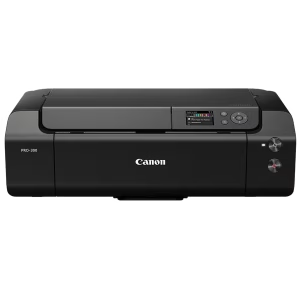
Canon imagePROGRAF PRO-300 | A3+ | Inkjet Printer
Elevate Your Artistry with the Canon imagePROGRAF PRO-300 Professional Inkjet Printer
Transform your vision into reality with the Canon imagePROGRAF PRO-300, a powerhouse of color and precision. Designed specifically for professional photographers, graphic designers, and fine art creators in South Africa, this printer delivers gallery-quality results that demand attention.
Featuring a sophisticated 10-color ink system, the PRO-300 ensures deep blacks, vibrant tones, and incredibly smooth gradations. The inclusion of the Chroma Optimizer ensures that every print has a consistent finish, making it the ideal choice for high-end portraiture, landscape photography, and intricate graphic designs.
Key Features:
Exceptional Color Accuracy: Reproduce colors exactly as you see them on your screen.
Archival Quality: Long-lasting prints that stand the test of time—essential for professional portfolios.
High Resolution: Crisp details that capture every texture and nuance.
User-Friendly Interface: Streamlined workflow to get from digital file to physical masterpiece faster.
Compact Professional Footprint: High-end output without requiring a massive studio space.
Whether you are printing high-end wedding photos or large-scale art prints, the Canon imagePROGRAF PRO-300 is your reliable partner in professional production.SKU: IP-CP300 -
Inkjet Printers
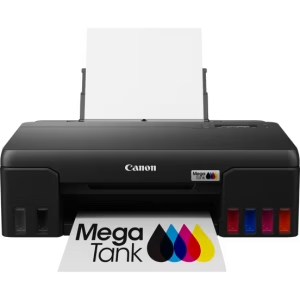
Canon PIXMA G540 | Inkjet Printer
Durable & Economical High-Volume Printing with the Canon PIXMA G540
Empower your productivity with the Canon PIXMA G540, an ink tank printer designed for those who need high-volume output without the premium price tag of replacement cartridges. This model is a fantastic choice for South African students, home offices, and small businesses that require reliable, everyday printing performance.
The G540 features an integrated ink tank system that allows you to print thousands of pages with significantly less maintenance. Whether you are printing academic reports, business documents, or vibrant photos, the G540 ensures crisp text and vivid colors every time. It is built to be a workhorse—providing high-quality results while keeping your operational costs low.
Key Features:
High-Capacity Ink Tanks: Print more for less with a system designed for longevity and lower cost per page.
Reliable Performance: Engineered for durability, making it ideal for heavy daily use in any environment.
Excellent Print Quality: Delivers sharp text and high-quality graphics for professional results.
Compact & Efficient: A space-saving design that fits perfectly into your workspace without compromising on performance.SKU: IP-CG540 -
Inkjet Printers
Canon PIXMA iX6840 | A3+ | Inkjet Printer
Professional Quality & Vibrant Color with the Canon PIXMA iX6840
Elevate your printing experience with the Canon PIXMA iX6840, a high-performance inkjet printer designed to deliver exceptional results. Whether you are producing professional marketing materials, stunning photographs, or sharp business documents, the iX6840 provides the perfect balance of speed, quality, and compact design.
Designed for those who demand excellence in every print, the iX6840 produces vivid colors and deep blacks, making it a favorite for creative professionals and small businesses in South Africa. Its sleek, space-saving footprint ensures it fits perfectly into any workspace without sacrificing power. Experience consistent performance and high-resolution output that brings your projects to life.
Key Features:
Superior Image Quality: Delivers vibrant colors and sharp details for both photos and professional documents.
High-Resolution Output: Ensure every detail is crisp, making it ideal for marketing materials and school projects.
Compact & Stylish Design: A modern aesthetic that fits easily on any desk or in small office spaces.
Reliable Performance: Engineered to provide consistent print quality over time.SKU: IP-CIX6840 -
Inkjet Printers
Canon PIXMA G1411 | Inkjet Printer
High-Volume, Cost-Effective Printing with the Canon PIXMA G1411
Maximize your productivity while minimizing your costs with the Canon PIXMA G1411. Designed specifically for high-volume printing tasks, this ink tank printer is a powerhouse for students, home offices, and small businesses in South Africa who need reliable performance without the constant cost of replacing cartridges.
The G1411 features an advanced ink tank system that allows you to print thousands of pages with minimal refills, making it the ideal workhorse for printing documents, forms, and high-quality graphics. Its robust build ensures longevity, while the sharp text and vibrant colors ensure your professional documents always look their best.
Key Features:
Ink Tank System: Enjoy significantly lower costs per page compared to traditional cartridge printers.
High-Volume Reliability: Built for heavy-duty use, perfect for school projects or business administrative tasks.
Superior Quality: Delivers crisp text and vivid imagery every time you hit print.
Space-Efficient Design: A sturdy, compact frame that fits perfectly into any workspace.SKU: IP-CG1411


There are no reviews yet.