




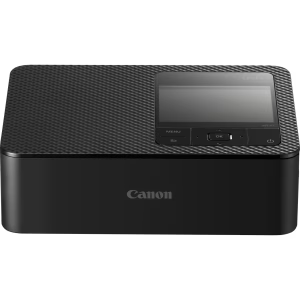
Canon SELPHY CP1300 | Photo Printer
Experience the next level of instant photography with the Canon SELPHY CP1300. This advanced portable photo printer is designed to turn your digital memories into high-quality, tangible keepsakes in seconds. Utilizing cutting-edge “TrueColors” technology, the CP1300 produces vibrant, high-resolution images with deep blacks and vivid tones that stay true to your original files.
The standout feature of the SELPHY series is its dye-sublimation process, which creates prints that are not only beautiful but also water-resistant and smudge-proof—making them perfect for scrapbooking, gifting, or sharing at events. Its compact, sleek design ensures it fits easily into a bag, making it the ultimate companion for weddings, birthday parties, or travel adventures. Whether you’re printing from a smartphone or a tablet, the CP1300 offers a seamless user experience for high-quality results every time.
Key Features:
TrueColors Technology: Delivers vibrant, realistic colors and deep blacks.
Durable Finish: Produce prints that are water-resistant and resistant to fingerprints or smudging.
Portable & Stylish: A sleek design that makes it easy to carry anywhere you go.
Versatile Printing: Create various sizes including 3.5x5in, 4x6in, and more for diverse creative needs.
Easy Mobile Connection: Quick and intuitive setup via your mobile device.
R2399.00
Bring your memories to life with the Canon SELPHY CP1300. This premium portable printer uses “TrueColors” technology to deliver vibrant, smudge-proof, and water-resistant photos instantly. Compact enough for any occasion, it’s the perfect way to turn smartphone snapshots into high-quality physical keepsakes.
Printing System
Method
Dye-sublimation thermal transfer printing system
Maximum resolution
300 x 300 dpi
Colours
3 colour inks (yellow, cyan, magenta) with protective over coating
256 levels per colour (24 bit colour depth)
Media & Cartridge
Postcard Size
148 x 100 mm -KP-36IP, KP-108IN, RP-108, RP-1080V
Credit Card Size
86 x 54 mm – [KC-36IP]1
Credit Card Size Stickers
86 x 54 mm – [KC-18IF]2
Square Stickers
50 x 50 mm – [KC-18IS]3
Mini Stickers
22.0 x 17.3 mm (x8 stickers on one sheet) – [KC-18IL]4
Ink Cartridge
Included with media
Image Longevity
100 Years Print5
Media Input
Sheet Feeder
Auto feed from paper cassette
Print Speeds
Printing
Print Modes
Select & Print (Selection of individual images and number of copies for batch printing), All image print (Selection of all images and number of copies for batch printing), DPOF Image Print, Reprinting, ID Photo Print (Standard / Custom / Dual)
Print Settings
Print finish:
Glossy, Semi-Gloss (Pattern 1 / Pattern 2 / Pattern 3)
Image layout:
Borders (Bordered / Borderless), Page Layout (1 / 2 / 4 / 8 images per page, 2 images per page fixed size (Background (White / Black) / Center), 2 x 6 photo strips, Index, Shuffle (8 / 20 images per page (Multiple smart devcies can connect to printer via Canon PRINT app)10 / Orientation (Landscape / Portrait) / Background (White / Black))
Image manipulation:
Intelligent scene and face detection via Image Optimize, iContrast, Brightness (7 levels, from -3 to +3), Colour Adjustment (7 levels (C-R) x 7 levels (Y – B)), Smooth Skin, My Colors (Vivid / Neutral / Positive Film / Sepia / B/W / Off), Red-eye Correction, Cropping
Printer settings:
ID Photo Priority, Keep Print Settings, Paper re-use prevention dots, Date (Prominent / Subtle / Off), Date Format, File Number (Prominent / Subtle / Off)
Print Method
Direct Printing From a Camera
PictBridge compliant (USB and Wireless LAN)
Direct From a Memory Card
Direct From a Camera Phone
Compatible with smartphones, tablets and portable devices via Wi-Fi (Direct or Infrastructure connection)13 14:
iOS devices:
Canon PRINT Inkjet/SELPHY app
Apple AirPrint
Android devices:
Canon PRINT Inkjet/SELPHY app
Canon PRINT Service plugin (version 1.20 or later)
Mopria Print Service
Kindle Fire OS devices:
Canon Print Plugin
Mopria Print Service
Print From a Computer
Yes, requires standard USB cable or compatible Wi-Fi connection.
Interface
Camera
USB:
Via Type A USB port on printer
Wi-Fi:
Via PictBridge via WLAN compatible digital cameras
Computer
USB:
mini-B port on printer
Wi-Fi:
(IEEE802.11 b/g)
LCD Monitor
8.1 cm (3.2″) Colour TFT viewer with multi-language user interface and tilt mechanism
(Languages: English, German, French, Italian, Spanish, Russian, Simplified Chinese, Traditional Chinese, Korean, Thai, Hindi, Vietnamese, Malaysian, Japanese, Portuguese, Turkish, Arabic)
Supported Operating System
Software
Drivers
Windows
Power Source
AC Power Supply
Yes, supplied
Battery Pack
Yes, optional NB-CP2LI (Approx. 72 Postcard size prints per full charge)
Power Consumption
Approx. 4W (standby), approx. 60W (printing)
Auto Power Down available
Accessories
Case
Print on-the-go Bag DCC-CP3
CP Printer Carrying Case DCC-CP2
Paper Cassette
Card Size Paper Cassette PCC-CP400
Power Supply & Battery Chargers
AC Adapter CA-CP200B
All data is based on Canon’s standard testing methods.
Subject to change without notice.
- Requires optional paper cassette PCC-CP400
- Requires optional paper cassette PCC-CP400
- Requires optional paper cassette PCC-CP400
- Requires optional paper cassette PCC-CP400
- To test the image permanence of prints that are stored in an album, we use an accelerated testing method similar to how the image permanence of silver-halide photo papers are measured when stored in dark places. Print samples are printed with the optical density of 1.0 (each Bk, C, M,Y). The samples are kept in a certain environment of high temperature and 50% humidity. The rate of the decrease in the optical density and rate of yellow discoloration are recorded. The recorded results are then converted to the length of time when print image is kept in an environment of 23℃/ 50% humidity. <Criteria for estimation of print longevity> ‘The point where monochromatic/ reflective optical density shows loss of 30% (starting density of 1.0).
- Print speed can vary dependent on data size, print method, print finish setting, memory card type and capacity. Print speed is measured from start of printing excluding paper handling
- Print speed can vary dependent on data size, print method, print finish setting, memory card type and capacity. Print speed is measured from start of printing excluding paper handling
- Print speed can vary dependent on data size, print method, print finish setting, memory card type and capacity. Print speed is measured from start of printing excluding paper handling
- Print speed can vary dependent on data size, print method, print finish setting, memory card type and capacity. Print speed is measured from start of printing excluding paper handling
- Upto 8 smart devices can connect to the printer via Canon PRINT app at a given time for purpose of Shuffle print option via Wi-Fi, however only one device can send ‘Print’ command
- Irregularly sized images, or images that have been edited on a computer may not display or print. USB Devices that are not identified as “Removable media” (such as external hard drives) or do not use the FAT or exFAT file system or have GUID partition tables created on a Macintosh computer are not supported.
- Requires adapter (sold separately)
- Compatibility of Canon applications varies depending on your smart device model and operating system. For latest compatibility please refer to the app store on your smart device.
- For more compatibility information about Apple AirPrint on your Apple computer/ smart device, please refer to https://support.apple.com/en-gb/HT201311
- Printer driver can be downloaded from http://www.canon-europe.com/support, driver/software application compatibility with Windows 10 is only applicable when computer is operating in Windows 10 Desktop Mode only
- For more compatibility information about Apple AirPrint on your Apple computer/ smart device, please refer to https://support.apple.com/en-gb/HT201311
| Weight | 0.86 kg |
|---|---|
| Dimensions | 135.9 × 180.6 × 135.9 cm |
Based on 0 reviews
Be the first to review “Canon SELPHY CP1300 | Photo Printer”
Related products
-
Photo Printers
Canon PIXMA G640
Headline: Vibrant Colors & Exceptional Value – The Canon PIXMA G640
Experience the freedom of high-volume printing without the high costs of traditional cartridges. The Canon PIXMA G640 is designed for those who need to print more—whether it’s high-quality photos, colorful marketing materials, or everyday documents. By utilizing a high-capacity ink tank system, this printer allows you to print more pages with less frequent refilling, making it a powerhouse of economy and performance.
Engineered to deliver vivid colors and sharp details, the G640 ensures that every print—from personal photos to professional brochures—looks stunning. It is an ideal solution for South African home offices, small creative businesses, and students who need reliability and high-quality output.
Key Features:
High-Capacity Ink Tank System: Significantly lower your cost-per-page with large ink reservoirs that last much longer than standard cartridges.
Vibrant Color & Sharp Detail: Optimized for producing vivid images and clear text, perfect for both professional marketing and personal projects.
Reliable Performance: Built for consistent daily use, ensuring your printing stays smooth even during high-volume tasks.
Easy Maintenance: Designed with a user-friendly interface to make managing ink levels and printer maintenance simple and stress-free.
Space-Efficient Design: A compact footprint that fits perfectly in home offices or small boutique workspaces without taking up unnecessary space.
Unlock more creativity and less cost with the Canon PIXMA G640—your gateway to high-volume, high-quality printing in South Africa.SKU: IP-CG640O -
Photo Printers
Canon SELPHY CP1500 | Photo Printer
Elevate your photography experience with the Canon SELPHY CP1500. Designed for those who cherish their memories, this advanced portable photo printer uses cutting-edge “TrueColors” technology to produce professional-quality prints that stay true to the original colors and details of your digital files.
Unlike standard inkjet printers, the CP1500 utilizes a dye-sublimation process. This means every photo produced is not only vibrant but also water-resistant and smudge-proof—essential for scrapbooking, creating gifts, or sharing memories at events where items might be handled frequently. Its sleek, compact design makes it easy to take with you on trips, to weddings, or parties, allowing you to print high-quality photos from your smartphone or tablet in seconds.
Key Features:
TrueColors Technology: Ensures consistent color reproduction and deep blacks for a premium look.
Durable Prints: Produce smudge-proof and water-resistant photos that stand the test of time.
Compact & Portable: A stylish, lightweight design perfect for travel and on-the-go use.
Versatile Sizes: Easily print in various formats including 3.5x5in, 4x6in, and more to suit your creative needs.
Seamless Connectivity: Connect effortlessly with your mobile device to start printing instantly from your gallery or social media.SKU: n/a -
Photo Printers
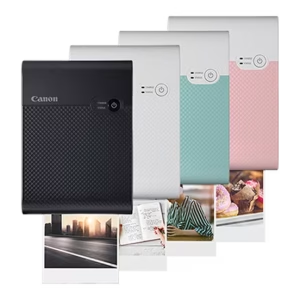
Canon SELPHY SQUARE QX10 | Photo Printer
Redefine how you share your memories with the Canon SELPHY SQUARE QX10. Designed specifically for those who love a modern, creative aesthetic, this portable photo printer specializes in high-quality prints that perfectly capture your unique style. Utilizing advanced “TrueColors” technology and dye-sublimation printing, the QX10 produces vibrant images that are both water-resistant and smudge-proof—making them perfect for scrapbooking, gifting, or sharing at events.
The SQUARE QX10 is engineered for convenience and style. Its compact frame makes it an easy addition to your bag, allowing you to print directly from your smartphone or tablet in seconds. Whether you are looking to create unique square-format prints that pop on social media or want high-quality physical copies of your favorite moments, the QX10 delivers professional-looking results every time.
Key Features:
TrueColors Technology: Ensures vivid colors and deep blacks for a premium look.
Durable Finish: Produces water-resistant and smudge-proof prints that last.
Compact & Stylish: A sleek design tailored for the modern lifestyle.
Instant Connectivity: Seamlessly link your mobile device to start printing immediately.
High-Quality Dye-Sublimation: Creates high-resolution images that stay sharp over time.SKU: n/a -
Photo Printers
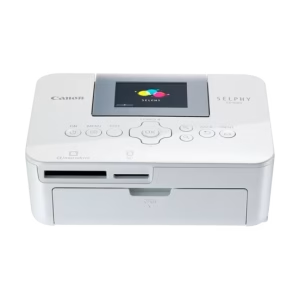
Canon SELPHY CP1000 | Photo Printer
Transform your favorite moments into stunning, high-quality physical prints with the Canon SELPHY CP1000. Designed for those who want to share memories instantly, this compact and portable photo printer uses advanced dye-sublimation technology to produce vibrant, smudge-proof, and water-resistant photos.
Whether you are capturing family milestones, travel adventures, or everyday snapshots, the “TrueColors” technology ensures every print reflects the depth and brilliance of the original image. Its sleek, pocket-sized design makes it the perfect companion for parties, weddings, or just creating a physical scrapbooking collection at home. With easy setup and intuitive operation, you can go from digital photo to tangible memory in seconds.
Key Features:
TrueColors Technology: Delivers high-quality prints with vivid colors and deep blacks.
Compact & Portable: Fits easily into your bag for on-the-go printing.
Durable Prints: Water-resistant and smudge-proof photos that last.
Versatile Sizes: Print in various sizes, including 3.5x5in, 4x6in, and more.
Easy Connectivity: Seamlessly connect your smartphone or tablet to start printing instantly.SKU: IP-CSCP1000



There are no reviews yet.